
Guides for Students and Teachers
Resources for teachers, students, writing centers, teaching assistants, and more to discuss the writing process, reflect on AI use, and explore writing process reports.
Student Guides
Guides for students to explore and reflect on their writing process or share their writing process report.
1. Student submission guide Read ↗
Sharing a writing process report with a teacher or peers.
2. How to share the edit link of a Google Docs document Read ↗
Instructions for obtaining and sharing the edit link to a Google Docs document.
3. How to reflect on your AI use Read ↗
Reflection activities for assignments that involved generative AI.
4. Why use Process Feedback Read ↗
How tools like Process Feedback support learning-first instruction.
5. 10-minute course for students
Coming soon…
Teacher Guides
Guides for teachers to explore and discuss their students’ writing processes.
1. Identify AI-assisted writing patterns Read ↗
Indicators based on copy-paste events, timing, and revision patterns.
2. Prompts for discussing the writing process Read ↗
Guided prompts for discussing a writing process report with students.
3. Samples Explore ↗
Sample teacher dashboards, custom editors, and writing reports.
4. I have many students—how can I review their writing processes?
Coming soon…
Using Process Feedback in a Course
Here are the main ways a teacher can integrate (or try) Process Feedback in a course.
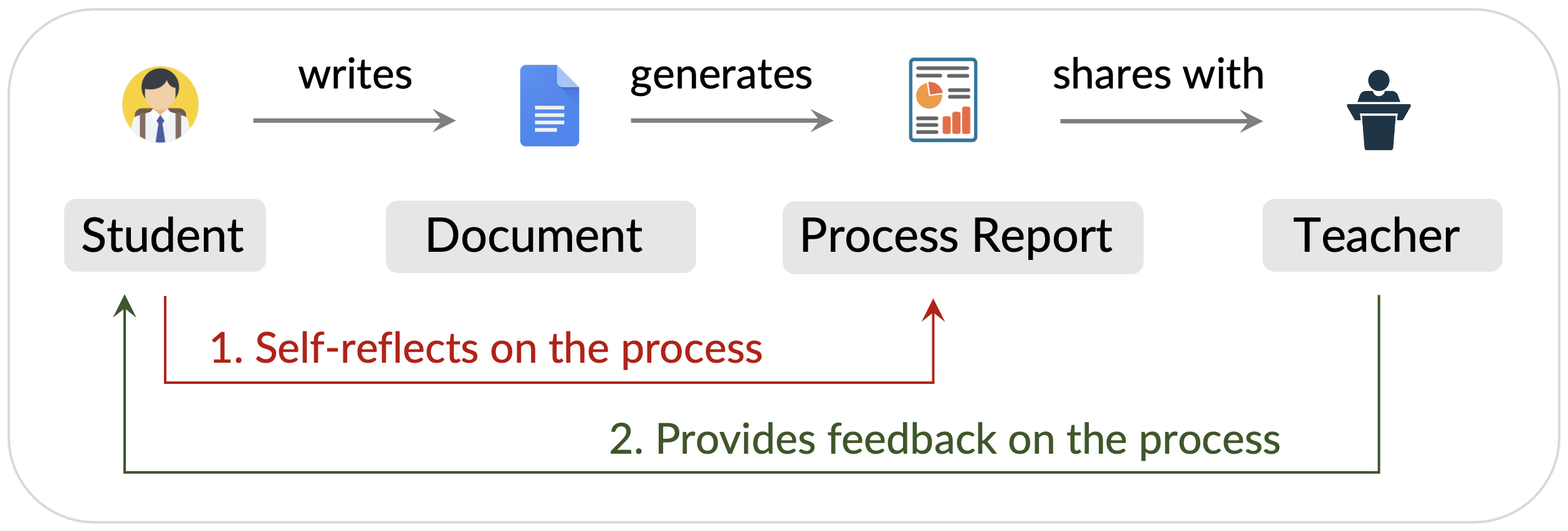
Option 1: Students use Google Docs or Process Feedback’s editor Read ↗
- Easiest option to pilot Process Feedback
- Students don’t need to install anything
Option 2: Create a special editor for your class Read ↗
- Recommended approach for most courses
- Students see the course name in the editor
Option 3: Create assignments in Process Feedback Read ↗
- Enables comparison across students
- All submissions appear in a dashboard
Option 4: Browser Extension for Canvas
Coming soon…